Jira Consultancy
Looking for a seamless way to manage client requests, track tasks, and optimize your team’s workflow? Our Jira Service Management setup ensures your projects run smoothly from start to finish. We specialize in configuring Jira for businesses of all sizes, delivering solutions that improve efficiency, transparency, and accountability.
What We Configure in Jira
At CodeDesk, we provide expert Jira Service Management configuration that helps service-based teams manage requests efficiently.
Jira for Agencies & Professional Services
At CodeDesk, we provide expert Jira Service Management configuration that helps service-based teams manage requests efficiently.
Law Firms Case Management
Track Cases, Client Requests & Legal Deadlines Effortlessly
Agencies Workflow Management
Manage campaigns, tasks, and internal approvals
Consultants Service Management
Monitor client deliverables and internal workflows
Professional Service Management
Centralize requests, reports, and team collaboration
IT
Service Management
Manage IT tickets, incidents, requests, and service workflows efficiently
Jira Powers High-Performing Teams
Why Jira Configuration Matters
Centralized Work Management
Jira brings tasks, requests, and issues into a single platform, reducing scattered communication and missed work.
End-to-End Visibility
Custom workflows and dashboards provide clear visibility into progress, blockers, and delivery risks at every stage.
Better Collaboration & Accountability
Defined roles, permissions, and transitions ensure teams know who owns what and when action is required.
Data-Driven Decision Making
Accurate reports and dashboards help leaders track performance, capacity, and trends without manual effort.
Case Study: Clinical Trials Operations Automation with Jira
Code Desk is a technology services company specializing in delivering tailored software and workflow solutions for businesses with complex operational needs. As part of one of its key engagements, Code Desk partnered with a medical company operating in the clinical trials industry to modernize and digitize their internal operations using Jira.
Customer Requirements
Fully customized workflows aligned with operations teams
Centralized Jira platform for clinical trial operations
Paperless documentation and approval processes
Secure electronic signatures for compliance
Integrated time tracking and financial management
Identified Challenges
Manual, paper-heavy processes causing delays and errors
No standardized workflows across teams
Disconnected systems for docs, approvals, and payments
Limited visibility into trial progress and finances
Compliance and audit readiness risks
Solution Delivered by Code Desk
Custom Jira workflows and issue types for trials
Digital documentation with DocuSign e-signatures
Tempo Timesheets for accurate time tracking
Jira–Xero integration for financial visibility
Centralized tracking of trials, approvals, and payments
Conclusion
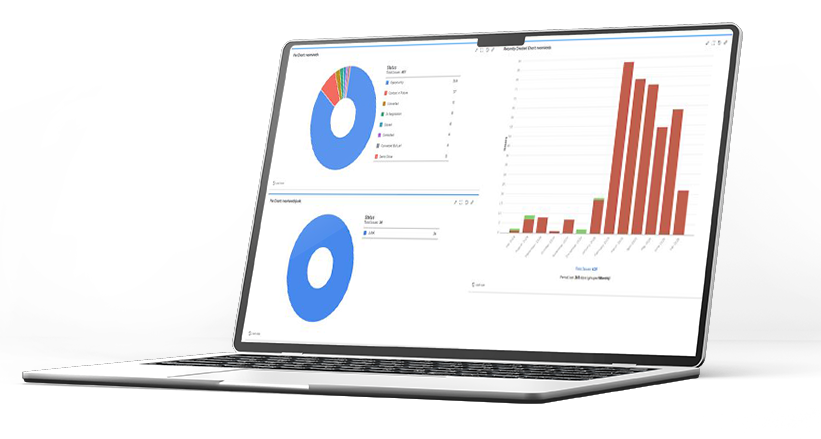
Dashboards Built for Clarity & Control
Move beyond manual updates and status calls. Our Jira dashboards are configured to give you instant visibility into:
Team workload distribution and utilization
Project health, risks, and delivery trends
Stakeholder-ready views for transparent reporting
Streamline Your Workflow with CodeDesk
Plan, track, and release projects with powerful tools built for modern teams.
How we work
Our Jira Configuration Process
Requirement
Analysis
We dive deep into your team’s workflows and pain points to craft a Jira setup tailored for maximum efficiency.
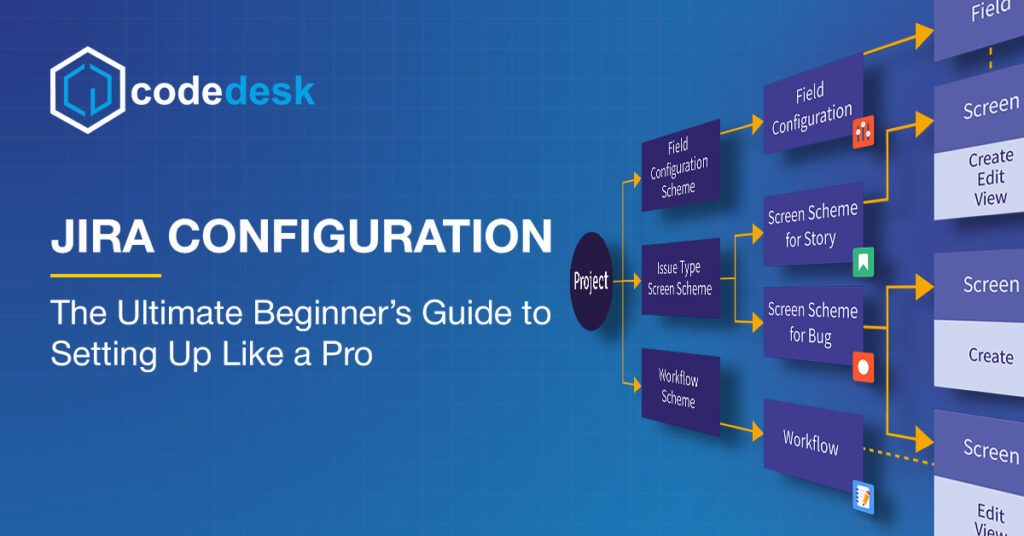
Workflow & Scheme Design
Custom workflows, issue types, and schemes designed to streamline your business processes before any configuration begins.
Configuration & Customization
Hands-on Jira setup including automation rules, dashboards, custom fields, and app integrations to supercharge productivity
User Acceptance Testing (UAT)
We test every workflow and configuration to ensure smooth operations and error-free performance.
Training &
Support
Tailored workshops and ongoing support to ensure your team hits the ground running with Jira.
Jira Tips, Tricks & Best Practices
Jira Consultancy FAQs – by Code Desk
Jira configuration means setting up Jira so it works the way your team works. This includes workflows, request forms, automation, dashboards, and user permissions. CodeDesk makes sure Jira feels simple, organized, and easy to use.
Yes. CodeDesk can fully set up Jira for you from project creation to workflows, request forms, automation, and dashboards so your team can start using it right away without confusion.
Yes. CodeDesk customizes Jira based on how your business operates whether you’re a service team, agency, consulting firm, or internal IT team. No one-size-fits-all setups.
Most Jira configurations take a few days to a couple of weeks, depending on how complex your requirements are. CodeDesk shares a clear timeline before starting.
CodeDesk combines expertise in Jira Service Management with a tailored approach to workflows, automation, security, and reporting ensuring you get a system that works for your business.
Not at all. CodeDesk works with small teams, growing businesses, and enterprises, and adjusts Jira to match your size and goals.
You can request a quote or consultation directly through the CodeDesk Jira configuration page and start with a discovery call to assess your Jira needs
Absolutely. If your current Jira setup is confusing or slow, CodeDesk reviews what you have, cleans it up, and improves workflows, automation, and reporting without breaking your existing work.
Fix Your Workflow With Jira Today!
We set up Jira to match how your team actually works. Clear workflows, faster delivery, zero chaos.